Writing
Working with Keras on Agent Platform Workbench
22 April 2019Updated 14 October 202621 min read
This workshop shows how to build, train and evaluate Keras models in a JupyterLab notebook on Google Cloud. It covers multilayer perceptrons, tf.data pipelines, TensorBoard, checkpointing, convolutional networks and recurrent networks.
Source Code
The original notebook for this workshop is on GitHub at https://github.com/dvdbisong/Working-with-Keras. The code on this page is the current version. It uses Keras 3 with the TensorFlow backend and was tested with TensorFlow 2.21 and Keras 3.15.
Create a Notebook on Agent Platform Workbench
Agent Platform Workbench is the managed JupyterLab service on Google Cloud. It was called AI Platform Notebooks when this workshop was first written and Vertex AI Workbench after that. In April 2026, Google renamed Vertex AI to Gemini Enterprise Agent Platform. A Workbench instance is a virtual machine that comes with JupyterLab and a preinstalled set of deep learning packages, including TensorFlow and PyTorch.
To create an instance:
- In the Google Cloud console, open Agent Platform and go to Workbench. Open the Instances page.
- Click Create new.
- Give the instance a name and choose a region. Click Advanced options if you want to change the machine type or add a GPU.
- Click Create. The instance is created and started.
- When the instance is ready, click Open JupyterLab.
The Workbench documentation lists every setting and the equivalent gcloud workbench instances create command.
Open a new notebook in JupyterLab. To run the code with the same versions used here, install them in the first cell and then restart the kernel. TensorFlow 2.21 no longer installs TensorBoard, so we install it separately.
python%pip install tensorflow==2.21.0 keras==3.15.1 tensorboard scikit-learn pandas matplotlib
The Anatomy of a Keras Program
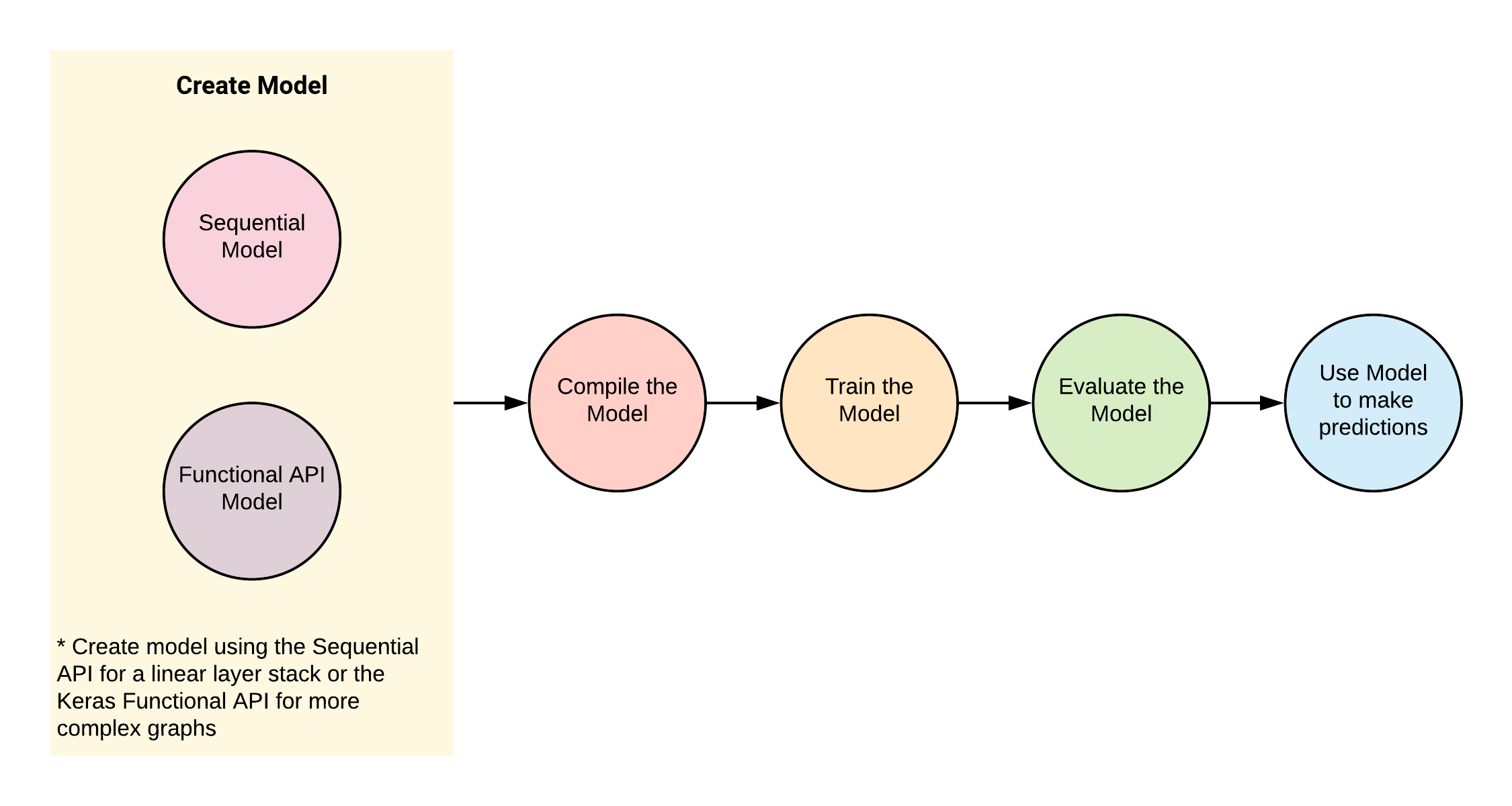
The Keras Model is the core of a Keras program. We construct a model, compile it, and then train and evaluate it on the training and evaluation datasets. When the evaluation results are good enough, we use the model to make predictions on data it has not seen before.
The Keras API
We can build a Keras model in two ways:
- The Sequential API,
keras.Sequential, builds a linear stack of layers. - The Functional API builds a
keras.Modelfrom a graph of layers. We use it for networks that are more complex than a linear stack.
Keras 3 runs on JAX, TensorFlow or PyTorch. It uses the TensorFlow backend unless you choose another one with the KERAS_BACKEND environment variable. Since TensorFlow 2.16, tf.keras also points to Keras 3. The code below imports Keras directly with import keras and uses TensorFlow for the tf.data input pipelines.
Multilayer Perceptron (MLP) with Keras
We'll go through the following steps:
- Import and transform the dataset.
- Build and compile the model.
- Train the model with
model.fit(). - Evaluate the model with
model.evaluate(). - Predict on unseen data with
model.predict().
The Dataset
The dataset for this example is Fashion-MNIST, a dataset of images of fashion articles. It follows the format of the MNIST handwritten digits dataset. It contains 70,000 grayscale images of 28x28 pixels in 10 classes. The training set has 60,000 images and the test set has 10,000 images. This dataset and others are available in the keras.datasets package.
Preprocess
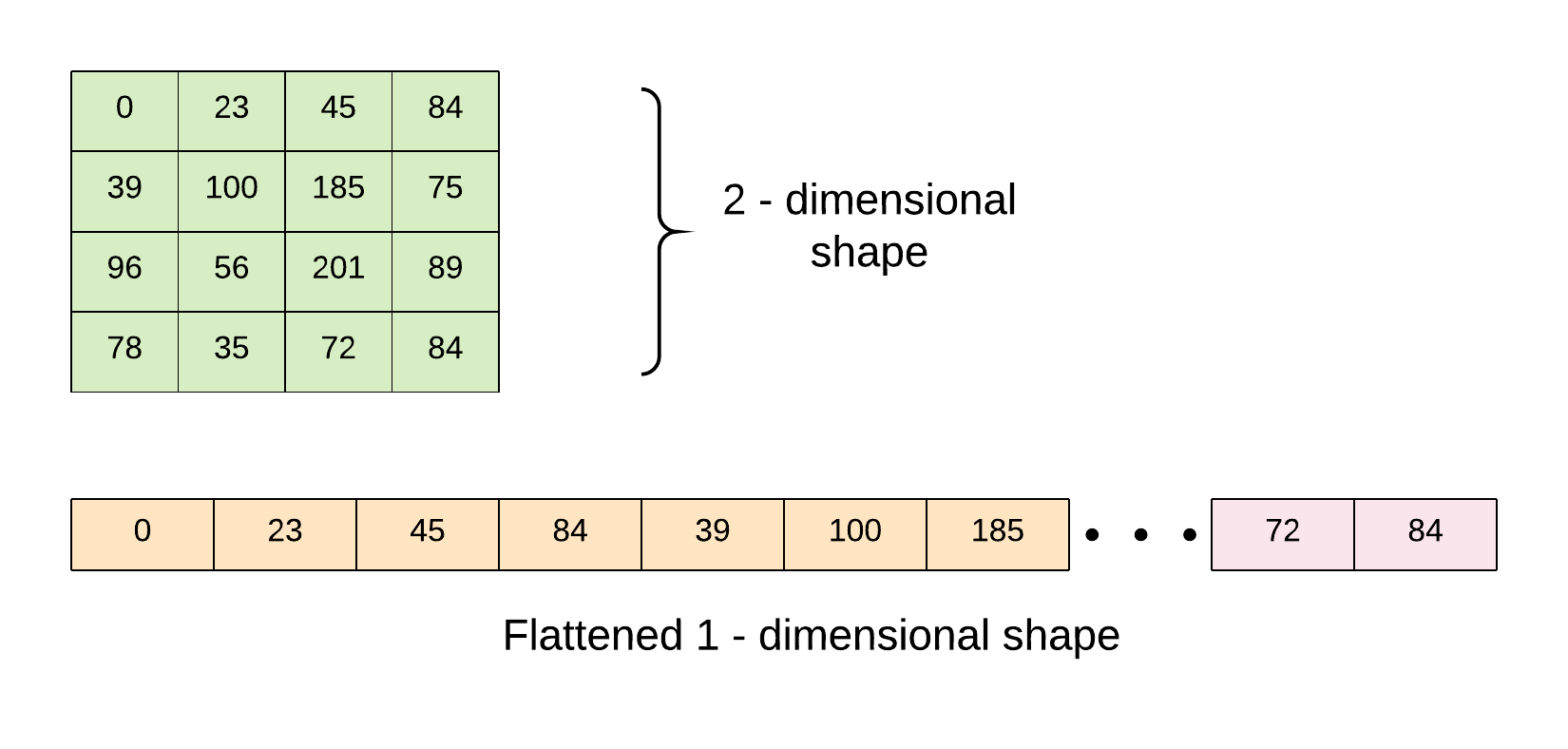
We flatten each image from a 2-dimensional shape to 1 dimension.
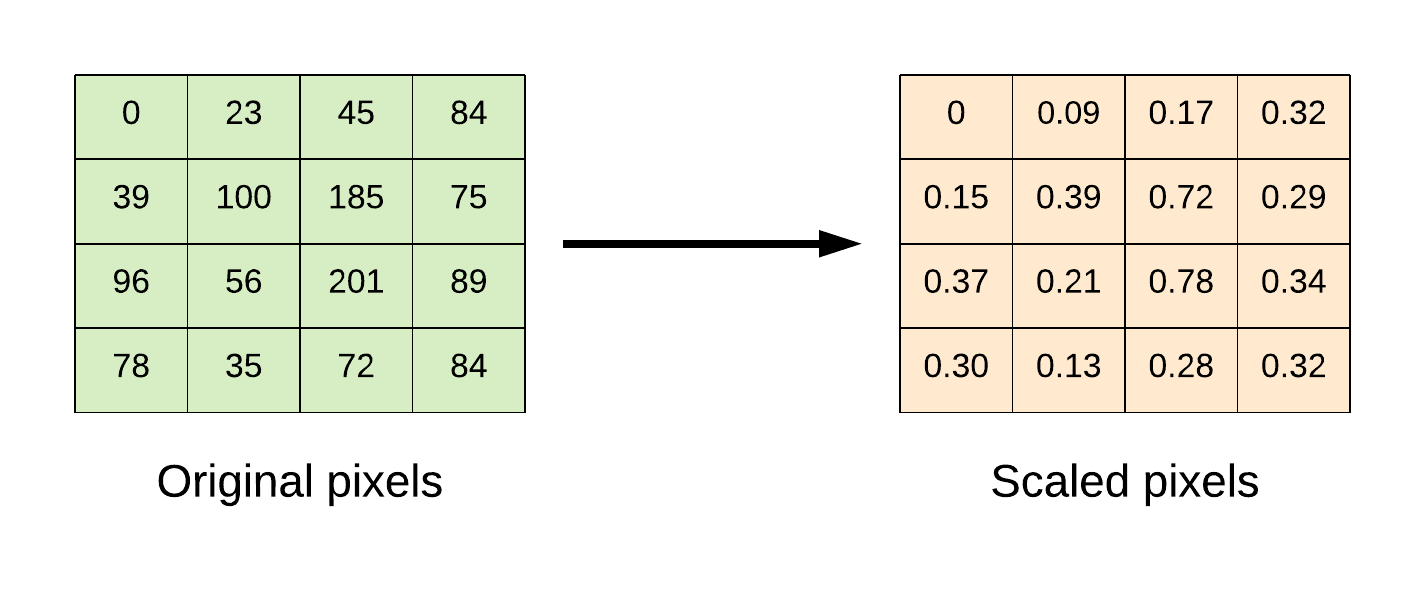
We also scale the pixel values from the range 0 to 255 to the range 0 to 1.
Code
pythonimport keras import numpy as np # import dataset (x_train, y_train), (x_test, y_test) = keras.datasets.fashion_mnist.load_data() # flatten the 28*28 pixel images into one long 784 pixel vector x_train = np.reshape(x_train, (-1, 784)).astype('float32') x_test = np.reshape(x_test, (-1, 784)).astype('float32') # scale dataset from 0 -> 255 to 0 -> 1 x_train /= 255 x_test /= 255 # one-hot encode targets y_train = keras.utils.to_categorical(y_train) y_test = keras.utils.to_categorical(y_test) # create the model def model_fn(): model = keras.Sequential() # Declare the shape of the input: a vector of 784 pixels model.add(keras.Input(shape=(784,))) # Add a densely-connected layer with 256 units model.add(keras.layers.Dense(256, activation='relu')) # Add a Dropout layer model.add(keras.layers.Dropout(0.2)) # Add another densely-connected layer with 64 units model.add(keras.layers.Dense(64, activation='relu')) # Add a softmax layer with 10 output units model.add(keras.layers.Dense(10, activation='softmax')) # compile the model model.compile(optimizer=keras.optimizers.Adam(learning_rate=0.001), loss='categorical_crossentropy', metrics=['accuracy']) return model # build model model = model_fn() # train the model model.fit(x_train, y_train, epochs=10, batch_size=100, verbose=1, validation_data=(x_test, y_test)) # evaluate the model loss, accuracy = model.evaluate(x_test, y_test, batch_size=100) print('Test loss: {:.2f} \nTest accuracy: {:.2f}%'.format(loss, accuracy * 100))
To predict on new data, pass the images to model.predict(). It returns one row of 10 class probabilities for each image.
python# predict the class of the first five test images predictions = model.predict(x_test[:5]) print(np.argmax(predictions, axis=1))
Using the Dataset API with Keras
The tf.data API is the preferred way to feed data to a model. It scales to very large datasets and makes better use of the machine's resources. We build the input pipeline with tf.data and the model with the Keras Functional API. In Keras 3, we pass a tf.data.Dataset straight to model.fit() and model.evaluate().
Code
pythonimport keras import numpy as np import tensorflow as tf # import dataset (x_train, y_train), (x_test, y_test) = keras.datasets.fashion_mnist.load_data() # flatten the 28*28 pixel images into one long 784 pixel vector x_train = np.reshape(x_train, (-1, 784)).astype('float32') x_test = np.reshape(x_test, (-1, 784)).astype('float32') # scale dataset from 0 -> 255 to 0 -> 1 x_train /= 255 x_test /= 255 # one-hot encode targets y_train = keras.utils.to_categorical(y_train) y_test = keras.utils.to_categorical(y_test) # parameters batch_size = 100 epochs = 10 # create dataset pipeline def input_fn(features, labels, batch_size, training=True): dataset = tf.data.Dataset.from_tensor_slices((features, labels)) if training: dataset = dataset.shuffle(buffer_size=1000) dataset = dataset.batch(batch_size) dataset = dataset.prefetch(tf.data.AUTOTUNE) return dataset train_ds = input_fn(x_train, y_train, batch_size=batch_size, training=True) test_ds = input_fn(x_test, y_test, batch_size=batch_size, training=False) # create the model with the Functional API def model_fn(): # model input model_input = keras.Input(shape=(784,)) # add a densely-connected layer with 256 units x = keras.layers.Dense(256, activation='relu')(model_input) # add a Dropout layer x = keras.layers.Dropout(0.2)(x) # add another densely-connected layer with 64 units x = keras.layers.Dense(64, activation='relu')(x) # add a softmax layer with 10 output units predictions = keras.layers.Dense(10, activation='softmax')(x) # the model model = keras.Model(inputs=model_input, outputs=predictions) # compile the model model.compile(optimizer='adam', loss='categorical_crossentropy', metrics=['accuracy']) return model # build the model model = model_fn() # print model summary model.summary()
python# train the model history = model.fit(train_ds, epochs=epochs, validation_data=test_ds)
python# evaluate the model loss, accuracy = model.evaluate(test_ds) print('Test loss: {:.2f} \nTest accuracy: {:.2f}%'.format(loss, accuracy * 100))
TensorBoard with Keras
To visualize a model with TensorBoard, pass a keras.callbacks.TensorBoard() callback to model.fit(). The callback writes the model graph, scalars, histograms and other metrics as event files in the log directory.
For this example, we'll build an MLP model on the MNIST handwritten digits dataset and view it in TensorBoard.
Code
pythonimport keras import numpy as np # import dataset (x_train, y_train), (x_test, y_test) = keras.datasets.mnist.load_data() # flatten the 28*28 pixel images into one long 784 pixel vector x_train = np.reshape(x_train, (-1, 784)).astype('float32') x_test = np.reshape(x_test, (-1, 784)).astype('float32') # scale dataset from 0 -> 255 to 0 -> 1 x_train /= 255 x_test /= 255 # one-hot encode targets y_train = keras.utils.to_categorical(y_train) y_test = keras.utils.to_categorical(y_test) # create the model def model_fn(): inputs = keras.Input(shape=(784,)) x = keras.layers.Dense(128, activation='relu')(inputs) x = keras.layers.Dropout(0.2)(x) x = keras.layers.Dense(64, activation='relu')(x) prediction = keras.layers.Dense(10, activation='softmax')(x) model = keras.Model(inputs=inputs, outputs=prediction) # compile the model model.compile(optimizer='adam', loss='categorical_crossentropy', metrics=['accuracy']) return model # build model model = model_fn() # tensorboard tensorboard = keras.callbacks.TensorBoard(log_dir='./tmp/logs_mnist_keras', histogram_freq=1, write_graph=True, write_images=True) # train the model history = model.fit(x_train, y_train, epochs=10, batch_size=100, verbose=1, validation_data=(x_test, y_test), callbacks=[tensorboard]) # evaluate the model loss, accuracy = model.evaluate(x_test, y_test, batch_size=100) print('Test loss: {:.2f} \nTest accuracy: {:.2f}%'.format(loss, accuracy * 100))
Load the TensorBoard notebook extension and start TensorBoard inside the notebook.
python%load_ext tensorboard
python%tensorboard --logdir tmp/logs_mnist_keras
Checkpointing to Select the Best Model
Checkpointing saves the weights of the model each time the validation accuracy improves. In Keras, we do this with the keras.callbacks.ModelCheckpoint() callback. We can then load the saved weights back into the model and use it to make predictions.
Using the MNIST dataset, we'll build a model that saves its weights to a file only when the performance on the validation set improves. In Keras 3, a file of weights must end in .weights.h5. A file that holds the whole model must end in .keras. The metric name to monitor is val_accuracy.
Code
pythonimport keras import numpy as np # import dataset (x_train, y_train), (x_test, y_test) = keras.datasets.mnist.load_data() # flatten the 28*28 pixel images into one long 784 pixel vector x_train = np.reshape(x_train, (-1, 784)).astype('float32') x_test = np.reshape(x_test, (-1, 784)).astype('float32') # scale dataset from 0 -> 255 to 0 -> 1 x_train /= 255 x_test /= 255 # one-hot encode targets y_train = keras.utils.to_categorical(y_train) y_test = keras.utils.to_categorical(y_test) # create the model def model_fn(): inputs = keras.Input(shape=(784,)) x = keras.layers.Dense(128, activation='relu')(inputs) x = keras.layers.Dropout(0.2)(x) x = keras.layers.Dense(64, activation='relu')(x) prediction = keras.layers.Dense(10, activation='softmax')(x) model = keras.Model(inputs=inputs, outputs=prediction) # compile the model model.compile(optimizer='adam', loss='categorical_crossentropy', metrics=['accuracy']) return model # build model model = model_fn() # checkpointing: save the weights when validation accuracy improves checkpoint = keras.callbacks.ModelCheckpoint('mnist.weights.h5', monitor='val_accuracy', save_weights_only=True, save_best_only=True, mode='max', verbose=1) # train the model history = model.fit(x_train, y_train, epochs=10, batch_size=100, verbose=1, validation_data=(x_test, y_test), callbacks=[checkpoint]) # load the best weights back into the model model.load_weights('mnist.weights.h5') # evaluate the model loss, accuracy = model.evaluate(x_test, y_test, batch_size=100) print('Test loss: {:.2f} \nTest accuracy: {:.2f}%'.format(loss, accuracy * 100))
Convolutional Neural Networks (CNNs) with Keras
In this section, we use Keras to build a Convolutional Neural Network. The network is similar to the Krizhevsky architecture and has the following layers:
- Convolution layer: 64 filters, kernel_size => [5 x 5]
- Convolution layer: 64 filters, kernel_size => [5 x 5]
- Batch Normalization layer
- Convolution layer: 64 filters, kernel_size => [5 x 5]
- Max pooling: pool size => [2 x 2]
- Convolution layer: 64 filters, kernel_size => [5 x 5]
- Convolution layer: 64 filters, kernel_size => [5 x 5]
- Batch Normalization layer
- Max pooling: pool size => [2 x 2]
- Convolution layer: 32 filters, kernel_size => [3 x 3]
- Convolution layer: 32 filters, kernel_size => [3 x 3]
- Convolution layer: 32 filters, kernel_size => [3 x 3]
- Max pooling: pool size => [2 x 2]
- Dropout layer
- Dense layer: units => [512]
- Dense layer: units => [256]
- Dropout layer
- Dense layer: units => [10]
Dataset
The dataset for this example is the CIFAR-10 image dataset. It has 60,000 colour images of 32x32 pixels in 10 classes, with 6,000 images per class. There are 50,000 training images and 10,000 test images. The 10 classes are airplane, automobile, bird, cat, deer, dog, frog, horse, ship and truck. This dataset is also available in the keras.datasets package.
Training this network on a CPU is slow. Add a GPU to the Workbench instance if you plan to run all 10 epochs.
Code
pythonimport keras import numpy as np import tensorflow as tf # import dataset (x_train, y_train), (x_test, y_test) = keras.datasets.cifar10.load_data() # change datatype to float x_train = x_train.astype('float32') x_test = x_test.astype('float32') # scale the dataset from 0 -> 255 to 0 -> 1 x_train /= 255 x_test /= 255 # one-hot encode targets y_train = keras.utils.to_categorical(y_train) y_test = keras.utils.to_categorical(y_test) # parameters batch_size = 100 epochs = 10 # create dataset pipeline def input_fn(features, labels, batch_size, training=True): dataset = tf.data.Dataset.from_tensor_slices((features, labels)) if training: dataset = dataset.shuffle(buffer_size=1000) dataset = dataset.batch(batch_size) dataset = dataset.prefetch(tf.data.AUTOTUNE) return dataset train_ds = input_fn(x_train, y_train, batch_size=batch_size, training=True) test_ds = input_fn(x_test, y_test, batch_size=batch_size, training=False) # create the model def model_fn(): # model input: 32x32 colour images with 3 channels model_input = keras.Input(shape=(32, 32, 3)) x = keras.layers.Conv2D(64, (5, 5), padding='same', activation='relu')(model_input) x = keras.layers.Conv2D(64, (5, 5), padding='same', activation='relu')(x) x = keras.layers.BatchNormalization()(x) x = keras.layers.Conv2D(64, (5, 5), padding='same', activation='relu')(x) x = keras.layers.MaxPooling2D(pool_size=(2, 2), strides=2, padding='same')(x) x = keras.layers.Conv2D(64, (5, 5), padding='same', activation='relu')(x) x = keras.layers.Conv2D(64, (5, 5), padding='same', activation='relu')(x) x = keras.layers.BatchNormalization()(x) x = keras.layers.MaxPooling2D(pool_size=(2, 2), strides=2, padding='same')(x) x = keras.layers.Conv2D(32, (3, 3), padding='same', activation='relu')(x) x = keras.layers.Conv2D(32, (3, 3), padding='same', activation='relu')(x) x = keras.layers.Conv2D(32, (3, 3), padding='same', activation='relu')(x) x = keras.layers.MaxPooling2D(pool_size=(2, 2), strides=2, padding='same')(x) x = keras.layers.Dropout(0.3)(x) x = keras.layers.Flatten()(x) x = keras.layers.Dense(512, activation='relu')(x) x = keras.layers.Dense(256, activation='relu')(x) x = keras.layers.Dropout(0.5)(x) output = keras.layers.Dense(10, activation='softmax')(x) # the model model = keras.Model(inputs=model_input, outputs=output) # compile the model model.compile(optimizer=keras.optimizers.Nadam(), loss='categorical_crossentropy', metrics=['accuracy']) return model # build the model model = model_fn() # print model summary model.summary()
python# train the model history = model.fit(train_ds, epochs=epochs, validation_data=test_ds)
python# evaluate the model loss, accuracy = model.evaluate(test_ds) print('Test loss: {:.2f} \nTest accuracy: {:.2f}%'.format(loss, accuracy * 100))
Recurrent Neural Networks (RNNs) with Keras
This section uses a univariate time series of Nigeria's power consumption to build a Long Short-Term Memory (LSTM) Recurrent Neural Network. The CSV file comes from the code repository of the book Building Machine Learning and Deep Learning Models on Google Cloud Platform. The last lines of the file hold a note. We skip them when we load the file. We fit the scaler on the training set only and use it to transform the evaluation set. This keeps information from the evaluation set out of training.
pythonimport keras import matplotlib.pyplot as plt import numpy as np import pandas as pd from sklearn.model_selection import train_test_split from sklearn.preprocessing import MinMaxScaler # data url url = "https://raw.githubusercontent.com/Apress/building-ml-and-dl-models-on-gcp/master/code/Chapter_36/nigeria-power-consumption.csv" # load data, skipping the note at the end of the file data = pd.read_csv(url, index_col='Month', engine='python', skipfooter=2) # print column name print(data.columns) # change column names data = data.rename(columns={'Nigeria power consumption': 'power-consumption'}) # split in training and evaluation set data_train, data_eval = train_test_split(data, test_size=0.2, shuffle=False) # MinMaxScaler: fit the scaler on the training set and apply it to both sets scaler = MinMaxScaler(feature_range=(0, 1)) data_train = scaler.fit_transform(data_train) data_eval = scaler.transform(data_eval) # adjust univariate data for timeseries prediction def convert_to_sequences(data, sequence, is_target=False): temp_df = [] for i in range(len(data) - sequence): if is_target: temp_df.append(data[(i+1): (i+1) + sequence]) else: temp_df.append(data[i: i + sequence]) return np.array(temp_df) # parameters time_steps = 20 batch_size = 32 # create training and testing data train_x = convert_to_sequences(data_train, time_steps, is_target=False) train_y = convert_to_sequences(data_train, time_steps, is_target=True) eval_x = convert_to_sequences(data_eval, time_steps, is_target=False) eval_y = convert_to_sequences(data_eval, time_steps, is_target=True) # build model model = keras.Sequential() model.add(keras.Input(shape=train_x.shape[1:])) model.add(keras.layers.LSTM(128, dropout=0.2, recurrent_dropout=0.2, return_sequences=True)) model.add(keras.layers.Dense(1)) # compile the model model.compile(loss='mean_squared_error', optimizer='adam', metrics=['mse']) # print model summary model.summary()
python# train the model history = model.fit(train_x, train_y, batch_size=batch_size, epochs=20, shuffle=False, validation_data=(eval_x, eval_y))
pythonloss, mse = model.evaluate(eval_x, eval_y, batch_size=batch_size) print('Test loss: {:.4f}'.format(loss)) print('Test mse: {:.4f}'.format(mse)) # predict y_pred = model.predict(eval_x) # plot predicted sequence plt.title("Model Testing", fontsize=12) plt.plot(eval_x[0,:,0], "b--", markersize=10, label="training instance") plt.plot(eval_y[0,:,0], "g--", markersize=10, label="targets") plt.plot(y_pred[0,:,0], "r--", markersize=10, label="model prediction") plt.legend(loc="upper left") plt.xlabel("Time") plt.show()
When you finish the workshop, stop or delete the Workbench instance. A running instance keeps adding to your bill.

Ekaba Bisong is a Ph.D. researcher at the University of Victoria and the founder of SiliconBlast. More about me